
Hollywoodbets Mobile Guide
Want to bet on Hollywoodbets from your phone? You’re in the right place. As someone who has placed thousands of bets on mobile over the last decade, I can tell you that the Hollywoodbets mobile experience is one of the best in South Africa. This guide covers everything you need to know.

The Hollywoodbets Mobile Experience: An Expert’s View
Before we dive into the details, let’s be clear: you do not need to download an app to get the full Hollywoodbets experience. Their mobile website is a powerful, fast, and feature-rich platform that works on any smartphone browser, whether it’s an iPhone, Samsung, Huawei, or any other brand.
In fact, as I explain in my Hollywoodbets app guide, I personally prefer the mobile browser for its efficiency and because it takes up zero space on my phone. The design is simple and functional, prioritizing speed over flashy graphics, which is exactly what a serious punter needs. It’s built for betting, not for show.

The Data-Free Advantage
The single best feature of the Hollywoodbets mobile site is its Data-Free mode. For anyone in South Africa, this is a massive deal. It means you can log in, browse sports markets, and place your pre-match and live bets without using a single megabyte of your own data. This feature is a testament to how well they understand their local customers and is a huge reason they are so popular.
How to Place a Bet on Hollywoodbets Mobile
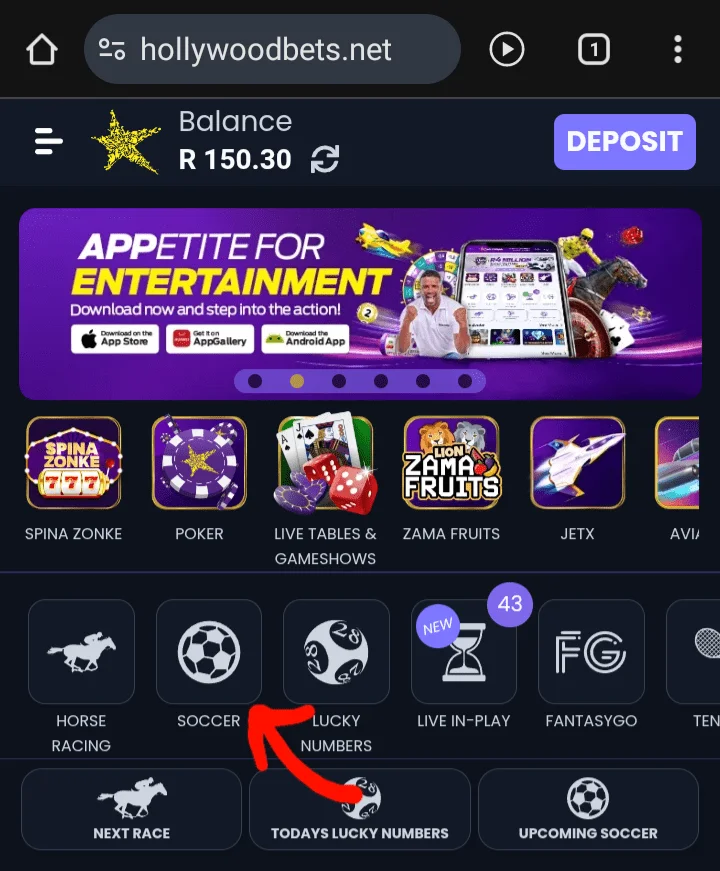
Placing a bet on your phone is a quick and intuitive process. Here is a visual guide to the exact steps:
- Log In & Find Your Sport: Open the Hollywoodbets mobile site and log in. Use the main menu on the left to navigate to your chosen sport, like “Soccer”.
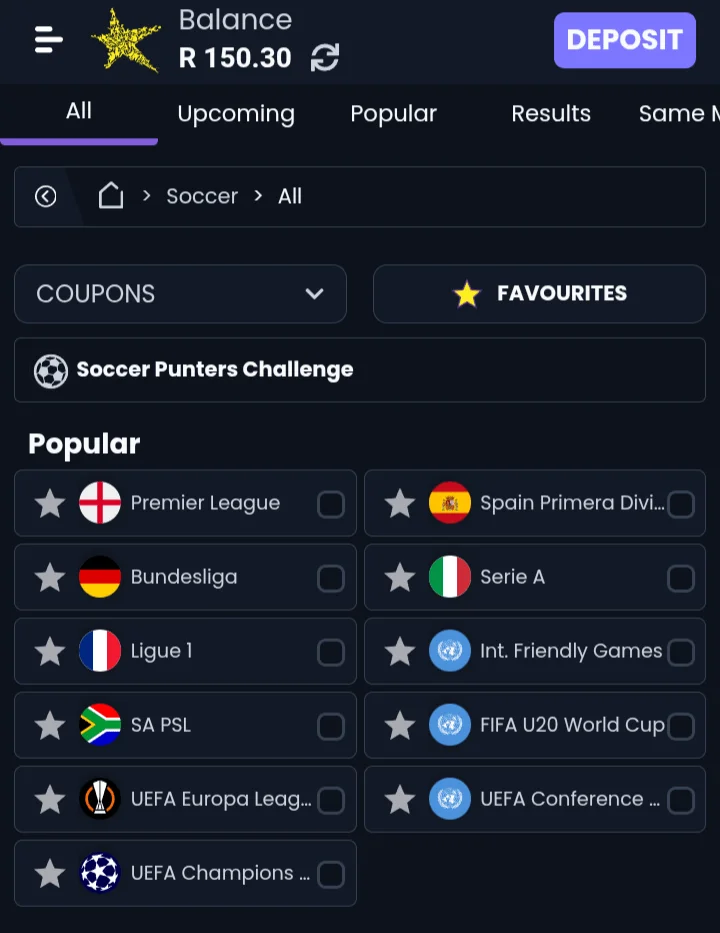
- Choose Your League & Match: You’ll see a list of countries. Select the country and league (e.g., England > Premier League) and then tap on the match you want to bet on.
- Make Your Selection: Tap the odds next to the outcome you want to back (e.g., tap the odds for a home team win). Your selection will turn green and be added to your bet slip.
- Enter Your Stake & Place Bet: Open your bet slip (usually at the bottom of the screen), enter the amount you want to stake in the box, and tap the “Submit Bet” button to confirm. It’s that simple.
Mobile Login & Password Reset Guide
Accessing your account is straightforward, but it’s easy to forget a password. Here’s how to handle both on the Hollywoodbets mobile site.
How to Log In
- Open the Hollywoodbets mobile site.
- Tap the “Log In” button at the top right of the page.
- Enter the Username/Mobile Number and Password you created during registration.
- Tap the green “Log In” button.
Forgot Your Password?
- On the login screen, tap the “Forgot Password?” link.
- Enter the mobile number or email address associated with your account.
- Hollywoodbets will send you an SMS or email with a link or code to securely reset your password.
- Follow the instructions to create a new password and regain access to your account.
Pro Tips for a Faster Mobile Experience
After years of using the platform, I’ve learned a few tricks to make betting even faster. Here are my top tips for using the Hollywoodbets mobile site like a pro:
- Use the Search Bar: Don’t waste time scrolling through leagues. The search bar at the top is your best friend. Type in a team name (e.g., “Kaizer Chiefs”) to find their next match instantly.
- Add to Home Screen: This is my number one tip. Follow the steps in my app guide to add a shortcut to your phone’s home screen. It gives you one-tap access just like a real app, saving you time.
- Know Your Bet Codes: If you get tips from friends or online, you can use the “Multiple Bet Code” feature to load a full bet slip instantly without searching for each match individually.
Mobile Site vs. “Old Basic” Version: What’s the Difference?
You might sometimes hear about an “old” or “basic” version of the Hollywoodbets mobile site. It’s important to know the difference. The modern, feature-rich site (the one I’ve shown in this guide) is the default and recommended experience for all smartphones. It includes graphics, Spina Zonke, and a full feature set.
The “old basic” version is a legacy, text-only site designed for very old phones with slow internet connections. While it still works, you should always use the modern mobile site for the best and most secure experience. Using any of the links on this page will always take you to the correct, modern version.
Other Key Mobile Features
The Hollywoodbets mobile site isn’t just for sports. You get access to their full range of products, all from the palm of your hand:
- Spina Zonke: The full library of popular Spina Zonke slot games is available on mobile.
- Horse Racing: Access their industry-leading horse racing platform, complete with live streaming of local races.
- Aviator & Crash Games: Play all the fast-paced games like Aviator directly in your browser.
- Account Management: You can easily make deposits, request withdrawals, and submit your FICA documents all through the mobile site.
Hollywoodbets Mobile FAQs
Is the Hollywoodbets mobile site safe to use?
Yes, absolutely. The Hollywoodbets mobile site uses the same SSL encryption as their desktop site and major banking apps. All of your personal and financial information is kept secure, making it completely safe to register, deposit, and bet.
Can I FICA my account on the Hollywoodbets mobile site?
Yes, you can. The mobile site has a dedicated section for uploading your FICA documents (a copy of your ID and proof of address). It’s a quick and easy process that you can complete directly from your phone.
How is the mobile site different from the Hollywoodbets app?
The core functionality is almost identical. Both offer data-free betting, Spina Zonke, and all betting markets. The main differences are that the app can send push notifications, while the mobile site uses no phone storage and is always automatically updated. For a full breakdown, you can read my Hollywoodbets app guide.
Can I check my bets on the Hollywoodbets mobile site?
Yes. Once you are logged in, you can easily access your full betting history by navigating to your account profile. This will show you all your open (pending) bets as well as a complete history of your settled (won and lost) bets.
What is the difference between the ‘New Site’ and the ‘Old Site’?
The ‘New Site’ is the modern, full-featured mobile website that this guide covers. The ‘Old Site’ or ‘Basic Version’ is a legacy, text-only site designed for very old phones or extremely poor internet connections. For the best security and full access to games like Spina Zonke, you should always use the new mobile site.
Get My Full Expert Analysis
The mobile experience is a huge part of what makes Hollywoodbets great. To see how it fits into my overall 5-star rating, read my complete review where I break down every aspect of their service.
Read My Full Hollywoodbets Review
Share this:

Discover more from SA Bet Finder
Subscribe to get the latest posts sent to your email.